Lesson 2
Team Websites
This will most likely be the most familiar of the three things we do for most of you.
What we work on as the non-robot programming group is creating websites that we need, keeping them updated, and removing outdated websites or ones that do not serve a purpose anymore.
Well, let’s look at some examples of our websites!
The Returnables Website - https://returnables.feds201.com/
This website is used for our biggest fundraiser ♻️ of the year: the can drive 🥫.
We promote QR codes with this website’s link, and people can enter their address and the time they want the pickup 🛻 to occur.
This helps us manage our time and our fundraiser more effectively.
Now let’s look at the code for this website!
https://github.com/feds201/Returnable-App/blob/main/
Once you are on the GitHub page, find index.html and script.js.
These two files are written in two different languages. You can find out which language by what is written after the . in the file name.
In the case of index.html, the file is written in HTML.
But how about script.js?
It is written in JavaScript, as js is short for JavaScript.
Now, click on the files and take a look at the code inside them.
You probably noticed a lot of complicated code that seems impossible 🤯 to write.
However, we don’t expect you to write that in 10 minutes 😂.
What we do expect is for you to learn the basics and grow your skills so you can code like that in the future 📈.
The G201 Calculator - https://g201.feds201.com/
Now let’s look at another example!
This website is used to calculate how eco-friendly 🍃 your robotics team is by answering the questions.
When we go to competitions and meet other teams, we give them a link to this website for them to fill out.
Now let’s look at the code for this website!
https://github.com/feds201/feds-central/tree/main/g201/calculator
This website’s code is similar to the Returnables website where it consists of an HTML file and a JavaScript file but also has a CSS file.
Take your time to check out index.html, the files inside the js folder, and the files inside the css folder.
Well, since we are familiar with some code now, let’s start coding!
The first language you are going to code in is HTML.
As we briefly talked about in the first lesson, HTML is the body structure of a website.
Click the link below to go to a website that will allow you to view your HTML code in real-time.
https://codeshack.io/html-viewer/
Let’s first put this code into the website. You can paste it in or type it on your own; your choice.
<html>
    <body>
        <h1> Non-Robot Programming! </h1>
        <h2> You will have fun coding </h2>
        <h3> You will meet new cool people </h3>
    </body>
</html>
Now, try changing the text. Do you see the texts changing in the viewer?
Heading Sizes
Try changing this line:
<h3> You will meet new cool people </h3>To this line:
<h1> You will meet new cool people </h1>What do you notice? Did the text get bigger?
Now try this:
<h6> You will meet new cool people </h6>What do you notice? Did the text get smaller?
Now you know, the number in <h1> and </h1> will determine the size of the heading.
<h1> is the biggest heading and <h6> is the smallest heading.
Line Breaks
Try to change this:
<h2> You will have fun coding </h2>To this:
<h2> You will have fun coding </h2> <br>What do you notice? Do you see the big gap between the two lines?
Now you know, <br> will create a “break” between the two lines. It works like pressing the Enter key.
Bold Text
Now, replace:
<h6> You will meet new cool people </h6>With this:
<b> hi </b> <br>
hi <br>
What do you notice? Do you see which text is bolded?
Now you know, <b></b> will make the text bold.
Italic Text
Now try this:
<i> hi </i> <br>
hi <br>
What do you notice? Do you see which text is italic?
Now you know, <i></i> will make the text italic.
Bullet Point Lists
Now for the last thing, try this right below where you just coded:
<ul>
    <li>Apple</li>
    <li>Banana</li>
    <li>Pineapple</li>
</ul>
What do you notice? Do you see the bullet points?
Now you know <ul></ul> will create bullet points (unordered list) with <li></li> as the listed items (list item).
Numbered Lists
Try this after:
<ol>
    <li>Apple</li>
    <li>Banana</li>
    <li>Pineapple</li>
</ol>
What do you notice? Do you see the number list?
Now you know <ol></ol> will create number lists (ordered lists) with <li></li> as the listed items (list item).
Mini Challenge: About Me
Now that you know how to code in HTML, write an About Me page in an HTML file.
The code must include:
- The biggest size font with your name
- A smaller sized font with the reason you like programming
- Your favorite school subject in bold
- Your favorite color in italic
- 3 bullet points of your favorite hobbies
- 3 number lists of your favorite foods
- Breaks between every different answer
Example of the page should look like this:
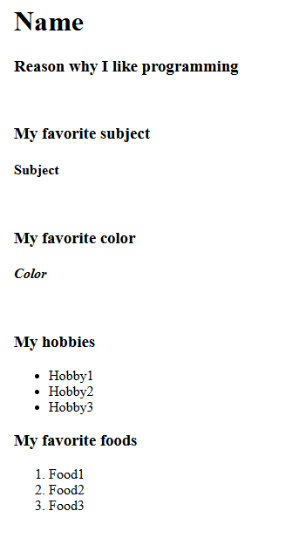
Once you are done, take the Lesson 2 Quiz to move on to Lesson 3.
If you did not get a score of 9/10 or better, you may retry whenever you want but I would recommend reviewing the lesson since this is not a graded test and is purely made for you to improve your skills.